Editor’s note: the Freedur VPN service, which is mentioned repeatedly below, has been acquired by MocaVPN and is managed by a different organization. Other VPN services are functionally equivalent though, so the information below might still be helpful in explaining how VPN services work. One VPN service that I can recommend with confidence is StrongVPN.
If you aren’t using a proxy to access the internet from the Mainland you’re missing out on a lot of great content – Youtube, Facebook, Twitter, and Blogspot to name a few of the most well known blocked sites. But it doesn’t stop with those: in everyday browsing you’re likely to come across other sites that you can’t access. Here’s how to get unlimited internet access free of blocks or restrictions by using an intermediary server.
What is a Proxy Server / VPN?
A virtual private network is defined as: a computer network that is implemented in an additional software layer on top of an existing larger network for the purpose of creating a private scope of computer communications
What does that mean in layman’s terms?
When you type Facebook.com into your browser the Great Firewall blocks access because that site is on a list. Anything on the list cannot be accessed directly from within the ‘Firewall because it controls incoming and outgoing connections. A proxy is an intermediary server which is not on the list and it, in turn, connects to any site you want since its access is unrestricted. Once software is installed and activated the process is seamless and you won’t notice which sites are blocked and which aren’t. Browse your friends Facebook photos to your hearts content and tweet about them if you like.
Is this free?
Of the services available several are free and monetized by advertising and others are ad-free but require a monthly fee. The most well known among free options was Hotspot Shield, although it bombarded users with advertisements and didn’t always work – that was before it was blocked outright. Unfortunately free proxies seem to get nailed pretty quickly so if you want a reliable solution you’ll be paying for the privilege of unrestricted internet access.
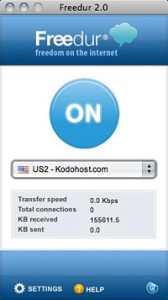
The best option that I’ve found is Freedur, which costs $6 a month or $60 annually. After downloading the small program, registering, and completing checkout with credit card or Paypal, you login with your username and password. You’ll be prompted to install a Firefox plugin (you are using Firefox, aren’t you?) and after that you simply press the enormous “On” button to start filtering all of your browser traffic. There are several servers you can select in a drop down menu including locations in the US, UK, and one specially optimized for Beijing. Simple as that. Even better, if you enter “chengduliving” into the coupon entry box at checkout you’ll save 10%.
Another option which also costs $60 annually is Witopia VPN. After signing up, a program creates an encrypted connection to an overseas server that grants you unrestricted access. Witopia actually goes a step further by offering the “Cloakbox”: a modified router which automatically routes all of its traffic through a private encrypted connection. It costs $200, which seems steep, but includes a year of service. Because they don’t offer a free trial I haven’t tried Witopia personally but judging by the glowing reviews online it looks outstanding. One thing to note about Witopia is that it’s a real VPN which routes all traffic through the encrypted connection – not just web browser traffic. If you’re downloading something on Bit Torrent, for example, that traffic will be routed through the VPN. That will work fine, but for people in China it’s not really necessary because the blocked resources that we’re trying to access are websites.
Another option (thanks, Callum) is the The Onion Relay, also known as Tor. Using this method, traffic is routed through a myriad of encrypted proxy computers like layers of an onion. Although designed as a tool for scientists, Tor has been abused by p2p downloaders and child pornographers in recent years. The downsides of this routing method are significant: because traffic is routed through a series of proxiy servers, speeds are often very slow and the whole thing is somewhat of a hassle to set up and configure (as evidenced by this 50-page FAQ). However, if you have the time and will to get it working, Tor is totally free because it operates on donated bandwidth.
How fast is it? Are there any downsides?
Since average internet speeds in China are sub-par even for developing countries, Freedur can easily max out my residential 2mb China Telecom internet connection which at its fastest, is downloading at 200kb/s. The Freedur application is small and works flawlessly – once the accompanying Firefox plugin is installed the giant On button works like you’d expect.
Conclusion
Whether you decide to try Freedur or Witopia, $60 for a year of service is a great value when you consider how much content it allows you access to from China. Free proxies are ridden with advertisements, distractions, and hassle – skip all of that and pay about 1 yuan a day to get unrestricted internet access with a VPN.
Are you using a proxy to access the internet? If so write about your experience in a comment below!
Disclaimer: Freedur doesn’t pay me and the opinions above are my own. Your VPN experience with Freedur or any other service might differ from mine, although I did test each VPN mentioned above on multiple computers at different locations. Should you have problems with Freedur or any other VPN, I suggest you contact them since I can’t help you.
Proxies seem to spring up, and then get found out really quickly. Does Freedur work on OSX?
You’re right, since this was written Hotspot Shield has been blocked.
Freedur works on OSX, yes.
A friend put me onto a couple of pieces of software called Vidalia and Tor. They seem to do the job perfectly and completely free.If you can’t find them online contact Eugene the Belarusky for them.
The only time I’ve ever gotten Tor to work it was super slow, which I learned is because the traffic goes through a byzantine network of proxies. If you or Eugene want to write a brief guide to setting up Tor I’d be happy to post it.
Eugene is more of a Tor pro than I, I will pass the message on to him.
Check out the Astrill review for an alternative to Freedur: https://www.chengduliving.com/unlimited-internet-access-with-astrill-vpn-review/
“Software Makers See a Market in Censorship”: http://www.nytimes.com/2010/01/16/technology/internet/16vpn.html
Freedur is way expensive now! I have no idea why!!
Skydur now doesn’t accept new members, and I have trouble extending my account! which was working great ..
Astrill seems good! but the payment options are limited! I cant use my credit card! I have to use CASHU or ALERTPAY or other things I never heard of.
Now, I’m using internet with restriction! which made me hate internet ..
officially, breaking up with internet in China ..
Thanks Charlie
Hey Coffee-
Yeah, they raised the price on Freedur considerably. But, if you use the “chengduliving” checkout code, you’ll get 50% off. 🙂
I still use Freedur everyday.
Hi Guys,
I just tried to register for Freedur, but I am not able to visit the freedur homepage.
Is it blocked from China?
Does somebody has another idea to get Freedur?
Thx for your efforts
I’m not sure, but it appears to be down for the time being. I sent an inquiry to the people in charge and I’ll leave a comment here as soon as I know what’s going on.
You can also try our Premium VPN Service at http://www.highspeedvpn.com . We offer High Speed VPN Accounts with USA IP Addresses.
Thank You!
Soon, there will be more Google Android phones in the U.S. than iPhones (and in China too). I own one of the latest ones with T-Mobile (I live in SoCal). My wife and I will be arriving in Chengdu this October and I was wondering what to expect from my U.S. Android phone with a Chinese sim-card in it. I did learn that as of a few days ago, the Chinese Gov. has made it law for all persons buying sim cards to register with proper I.D., so they can record it. That part in not my issue, but having a functional smart phone in China is. Will I be able to use many of my phone’s apps and functions there in China? I do plain on purchasing VPNinji, which is a VPN service. They are suppose to work well with Androids & iPhones. Any thoughts on the use of my smart phone there would be very helpful? Htanks in advance! 😉
Hi Ken,
You shouldn’t have any issue with your phone working in China. I’m pretty sure it will have 100% functionality, as far as I’m aware. You might have to take it to a computer market in Chengdu to have the phone unlocked, in order for it to support a cell network other than T-Mobile. It’s a quick and cheap process that will cost you pocket change.
Good luck!
I got Freedur after reading this review. It couldn’t possibly be any slower. I have to switch between locations frequently because it just stops at 0 and does nothing. Videos don’t stream at all and usually I have to wait for it to fully load first. I can do some simple browsing but I can’t have too many windows open at once. It’s been hell. My buddy has ExpressVPN and I’ll see how that goes. Seems to work better. Astrill would be my next try.
I’m going to go on a limb and guess that it’s more to do with your internet connection than Freedur. You should be corresponding with their support if you have problems with the service though, since there isn’t much I can do for you but tell you that I don’t have any issues. Good luck.
My issue is not computer related. It’s actually the speed and being unreliable. At first I thought it could be my general internet speed like you mentioned however when Freedur is off, my internet works perfectly fine. Youtube videos do not stream, though I do have some better days than others. I did bring up this issue to customer service and they were nice and helpful. The servers were actually down for awhile when I posted that comment. It’s happened several times. Many times I cannot browse at all. I did recommend this product to a friend as well but he had the same issues as I was and switched to Witopia though still slow but at least it works at all. I’m going to still switch to another VPN but keep using Freedur as a backup. I did find Freedur taking up a lot of memory and it has actually closed unexpectedly a few times but it’s not that serious on my end like Jane’s.
I actually have noticed Freedur taking up a lot of memory on OS X recently. I just close the application and restart it when I notice it taking up more than 150mb or so and the problem is fixed. Sorry to hear about your problems with Freedur! VPN services aren’t an exact science though, you’re bypassing a dynamic filtering system which is always changing. There’s going to be slowness and downtime on occasion but in the end you aim to choose a solution which minimizes the hassle.
The speed you get will depend on a number of factors including your internet speed and type, traffic on local and regional networks, distance from Freedurs servers, etc.
Anyone interested in Freedur should probably give their free trial a shot if they aren’t sure it’s for them. Ask for it on their homepage using the live support feature and they’ll hook you up.
Hey Michael:
This is most likely caused by the ISP you are on. In China, the internet is segmented by the North/South region between China Telecom and Unicom. China Telecom users usually get great connection but Unicom users vary largely in experience. We’ve setup special China Unicom servers and this seems to have improved the speed a lot but it’s not a blanket fix. The problem is, even within China, pining a China Unicom server can take much longer than pinging a server in the USA. Freedur in general is super fast as we overspend on servers to make sure of it, but unfortunately the few individual who are on bad Unicom nodes will continue to have problems connecting to North America overall until China fixes its internet infrastructure.
As for the memory leak, this is actually Firefox specific and we’re not sure who owns the responsibility. Regardless, we will be coming up with a fix for this in the next major update.
Thank you for trying Freedur and please do not hesitate to contact us anytime via our website.
Thanks for coming on here and shedding some light into the issue. Good to hear that you guys are working on it. I hope a more secure fix to this issue comes out soon. It gets very frustrating. Like I said, I want to keep Freedur still even if I choose to use another VPN with it. I like to have a backup and with a company that knows what’s going on. I appreciate the work you guys do.
Helpful info – thanks for posting that. I’m not using Firefox though, I use Chrome.
Here’s a screen shot to show what I’m talking about: http://cl.ly/592a5dc92cd40d492f70
I just close Freedur and restart it and it’s back to normal though, no big deal.
@Charlie, I’m really disappointed with you. I’m a regular visitor of your site and after reading your review for Freedur, I went to buy it. This software is just rubbish. I totally lost my internet connection thanks to this software. I really don’t know why are you promoting Freedur so much. How much do they pay you for this ? Really this will just ruin your and your site reputation.
@Michael: Your connection is totally ok. It’s just rubbish Freedur software which breaks everything.
I called a service to fix my computer after installing Freedur. After they fully removed Freedur, which wasn’t trivial at all, I got my Internet connection back.
I’m now on Witopia, it works but it’s so slow.
Anyone to recommend a better VPN (except Charlie) ?
Freedur automatically makes your house burn down and they pay me $10 million a day to promote it… lol
Seriously though,
I stand by everything I’ve written about Freedur and they haven’t paid me a dime.
When I say it works well, I’m not just saying that for the sake of it. I have Freedur installed on multiple computers, on multiple platforms and I use it everyday on Windows, OS X, and iPhone with zero problems. Additionally, I’ve recommended Freedur to a number of personal friends and not one of them has had major problems or complained. Yet here you are, a stranger on the internet, attacking me personally for recommending a product I’ve observed to work well.
Obviously, rejecting my advice is always an option. Good luck with Witopia.
I added a disclaimer to the end of the post for anyone else who holds me personally responsible for their computer crashing or house burning down.
@Jane
I’m sorry to hear about the problem you had, and we’re eager to find out if/why you’re having this problem. Please contact us via our support desk or our live support on our website. Someone will help you immediately.
Jane, could you please contact our support so we can figure out if/why you’re having the problem described? I tried looking you up in our database but we haven’t had a customer with the first name “Jane” within an active service for over 9 months…
Freedur freedur freedur, I can find this word in every comment of Charlie.
In fact, Freedur and Astrill( formorly skydur) are from same company, after a scandal (google it) things turing ugly…
Please give users best product for them, not for you.
As always, feel free to disagree with me or post suggestions for other VPN’s here in the comments. 🙂
Freedur is in no way affiliated with Astrill or Skydur. Astrill is the former Skydur, whose developers are former contractors of Freedur that cloned our service/technology nearly 2 years ago.
To date, Astrill(Skydur) continues its campaign of fabricating lies against Freedur on the internet and we will continue to defend it.
Jane and Just2U look suspiciously like Astrill people. You can usually spot them by their lack of regard for English grammar and baseless accusations.
Astrill, more efforts on your own product and less on attacking competing VPN services.
I’ve been using Freedur for a few weeks now and it’s been great. I really can’t attest to having any major problems besides the occasional hiccup.
To give your readers some more options which I see used frequently and successfully in China:
Overplay.net
StrongVPN.com
12vpn.com
Always good to have options. Thanks Jeff.
I’m giving away five 3-month VPN accounts for free in the forum. Come claim them if you don’t have a VPN http://www.chengduforum.com
You can also use Hotspot Shield Free VPN to get unrestricted access to the interent.
Download it from here: http://www.hotspotshield.com
An oppurtunity for an IT person to create a new VPN and sell them on a CD.Users could be notified via email. Stupid suggestion?
Freedur no longer exists. Check out this page. I tried the Freedur site but to no avail. Here is what the are offering now the moca vpn. http://www.vpnsp.com/freedur.html.
That’s right – Freedur has been shut down for ages. Thanks for posting this info, I will add a disclaimer at the top of this post.
Use TOR browser and its access points for better anonimity
http://www.linkbucks.com/AGX1X